Wedding planning
Wedding Table Plan — Step-by-Step Seating Guide
You've got your guest list, the RSVPs are rolling in, and you have a rough headcount. Now for the tricky part: the wedding table plan — deciding who sits where. One wrong move and your aunt might not speak to you for a year. We'll show you how to create a seating chart step-by-step, without any family drama.
What is a wedding table plan?
A table plan is a visual map of your venue, showing table numbers and guest names. Your guest list tells you who is coming. The table plan tells them where to sit.
Why do you need one? For three main reasons:
- Your venue and caterers need to know how many tables to set up and in what layout.
- Guests need to know where to go after the ceremony — without a plan, they'll be wandering around aimlessly.
- The waiting staff need to serve specific dietary meals. The server needs to know who gets the vegan dish, not guess their way around the table.
Start working on your plan once you have at least 80% of your RSVPs confirmed. Any earlier, and you'll end up doing it twice — changes are inevitable.
Wedding table shapes — what to choose
The shape of your tables affects the look of the room, the logistics of the service, and the overall atmosphere. Here are five common configurations.
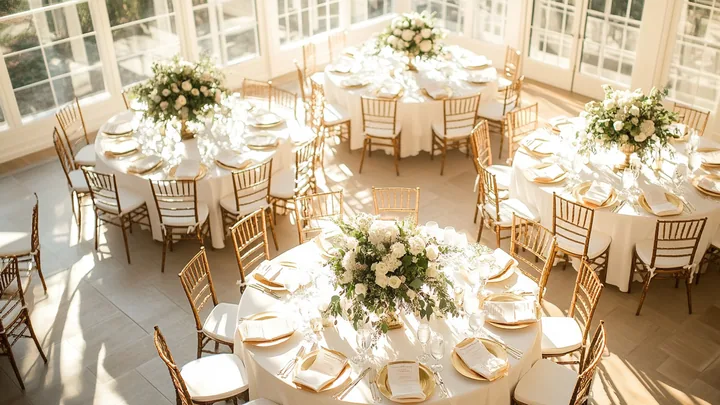
Round (8–10 people). A classic for elegant receptions. Pro: everyone can see each other, creating a sociable feel at each table. Con: it's hard to have one big conversation involving the whole table. A great choice for 80–200 guests in a classic venue.
Rectangular / banquet-style (10–14 people). Pro: space-efficient, and a long table can seat an entire family in one row. Con: you'll mostly talk to the 4–5 people sitting nearest to you. Ideal for smaller venues and seating family groups together.
Horseshoe (up to 30–40 people). Pro: creates an intimate, communal feel where everyone can make eye contact. Con: can be tricky for servers to navigate and might feel a bit cramped. Best for smaller weddings of up to 40 guests.
Imperial tables (long, 6m, for 20–30 people). Pro: they look stunning in photos and are perfect for elaborate styling. Con: they require a large, narrow room, and serving soup can be slower. A perfect fit for boho or rustic styles in a barn setting.
Mix: rectangular top table + round guest tables. Pro: you're at the centre of the action, while guests are comfortable in smaller groups. Con: you need to design the layout carefully to allow clear pathways for staff. A popular choice for weddings with 100+ guests in a traditional layout.
Pro tip: ask your venue about their standard layouts. Most places have tried-and-tested arrangements that work best for the space.
How to seat your guests — the rules
We'll show you how to seat your guests in order of priority — from the top table to the plus-ones.
The top table. Three main options. First: just the two of you (a 'sweetheart table') — trendy, romantic, and makes for better photos. Second: you plus your best man and maid of honour with their partners (the classic). Third: you plus your parents (less common, but works well for small weddings).
Parents and grandparents. Seat them close to the top table, in a prominent spot. Not next to a speaker or the DJ — a deafened grandad mid-reception is a problem you don't need. If your families don't know each other well, consider seating them at two separate tables.
Single guests. Don't put all your single friends at a designated 'singles' table' — it can feel a bit awkward. Mix them in with couples they know, preferably near the dance floor. If you have a tight-knit group of 4–5 single friends, it's fine to seat them together.
Children. If you have 5+ children, consider a separate kids' table with an entertainer. For fewer children, seat them with their parents. Children under 3 should always be with their parents.
Feuding relatives. Place them at tables on opposite sides of the room, but at an equal distance from the top table. Don't have them with their backs to each other or directly facing one another. The key is that no one should guess it was deliberate.
Work colleagues and business guests. Seat them together at one table — they'll have plenty to talk about. Don't mix them with family they don't know. Keep them a little further from the top table; they're there to celebrate, not to network.
Older guests. Seat them further from the speakers and the DJ, but closer to the toilets and the exit. Group them with their own generation — they'll have more in common to chat about.
Plus-ones you don't know. Seat them next to the person who invited them, not on their own. Never at the top table. If in doubt, ask the original guest where they'd prefer to sit.
When does the table plan need to be ready?
Work in time blocks. Each deadline has a specific purpose.
6–8 weeks before: Draft version. Create this after your RSVP deadline, when you have 80%+ of responses. Don't worry about final names yet — just group people (e.g., bride's family, work friends, children).
2–4 weeks before: Final version for printing. This is for your place cards, seating chart, and the plan for the venue staff. Dietary needs and allergies should be marked, with children on a separate list.
3–7 days before: Last-minute adjustments. For illnesses, last-minute cancellations. Call the printer with any changes. It's wise to leave one empty seat at each table as a buffer, just in case.
The day before: Put the printed place cards in a folder for your venue coordinator. Have a digital copy for your master of ceremonies or wedding host. Also, add the finalised table plan to your wedding day schedule. The venue staff need to know when guests will be seated and when to serve the first course.
Online tools for creating your table plan
Excel just won't cut it. It offers no visualisation, making it hard to imagine the room. One mistake in a column and someone's at the wrong table. It's also not a clear format to share with your caterer.
A good online tool should have:
- drag-and-drop functionality — visually move guests between tables
- guest list import from your RSVP tool to avoid manual entry
- dietary markers: vegetarian, vegan, gluten-free, child's meal
- high-resolution PDF export for printing
- a mobile-friendly version (for your wedding host to check on the day)
What to look for: integration with your RSVP system (you don't want to re-type 120 names), the ability to add notes (allergies, "don't seat next to Aunt Mary"), collaboration features (for you and your wedding planner), and an export option for your printer. If you collect RSVPs digitally, your guest list with dietary needs and plus-ones is generated automatically — no transcription needed.
Before you print, run through this checklist:
- Table numbers are visible from a distance
- Full guest names, not nicknames
- Dietary needs are marked on the staff's copy
- The top table is clearly marked as a reference point on the chart
- A key or legend is included at the bottom of the main seating chart
- One backup copy saved as a PDF on your wedding host's phone
The most common table plan mistakes
- Starting before the RSVPs are in. You'll just end up doing it twice.
- Creating a 'singles' table'. It can be awkward; don't use it as a space-filler.
- The 'distant relatives' table' tucked away at the back. They'll notice, and they won't be pleased.
- Forgetting to mark dietary needs. The result is a server carrying a salad around the room asking who ordered it.
- Printing before all confirmations are locked in. One cancellation means a whole set of place cards in the bin.
Frequently Asked Questions (FAQ)
How many people fit at a round wedding table?
Typically, 8 to 10 guests at a table with a diameter of 150–180 cm (60–72 inches). With more than 10 people, conversation becomes difficult — those sitting furthest apart can't hear each other.
Should the best man and maid of honour sit at the top table?
It depends on tradition. The classic setup is to have them at the top table with their partners. A more modern trend is for the couple to sit alone at a 'sweetheart table', with the wedding party hosting a nearby table with close friends. Both options are perfectly fine.
Does the table plan need to be displayed at the entrance?
Yes, this is standard practice. An A1 or A2-sized board with table numbers and names at the entrance to the reception allows guests to find their seats without chaos. Without it, staff can spend half an hour directing people.
How should we mark vegetarian meals on the plan?
The simplest way is to use a coloured dot next to the name on the copy for the venue staff. For example: green for vegetarian, blue for gluten-free, red for an allergy. Guests won't see this, but the kitchen and servers will.
Can guests choose their own seat at their assigned table?
Yes, this is a popular compromise. You assign guests to a table, and they choose their specific chair once they get there. This works well for tables of 8–10 people.
Collecting RSVPs digitally and want a guest list with all the dietary info in one place? With souveil, guests can note their dietary needs, transport plans, and plus-one details when they RSVP — giving you a ready-made list for your table plan.